If you’ve ever struggled with messy measuring cups or inconsistent recipes, a kitchen scale could be your secret weapon. Using a kitchen scale helps you get precise measurements every time, cutting down on guesswork and wasted ingredients.
Whether you’re baking delicate cakes or prepping meals for the week, knowing how to use your kitchen scale correctly will make your cooking easier and more enjoyable. Stick with me, and you’ll learn simple steps and smart tips to master your kitchen scale like a pro—no more second-guessing or messy counters!
Choosing The Right Scale
Choosing the right kitchen scale makes measuring ingredients easier and more accurate. A good scale helps you follow recipes correctly. It also reduces waste by giving precise amounts.
Many scales come with different features. Picking one that suits your needs saves time and effort in the kitchen. Consider size, units, and ease of use before buying.
Types Of Kitchen Scales
Mechanical scales use springs to measure weight. They do not need batteries. Digital scales show weight on a screen. They are more precise and easier to read.


Capacity And Accuracy
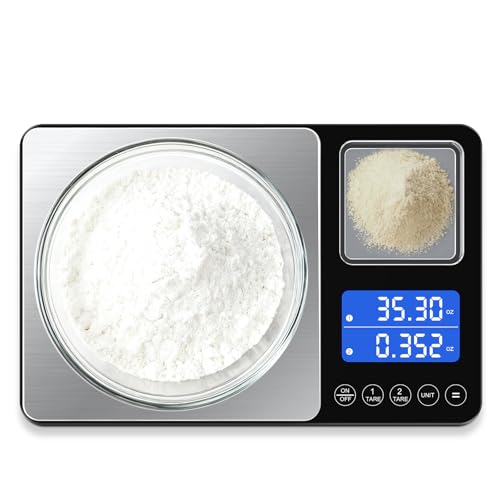
Check the scale’s maximum weight limit. Most kitchen scales measure up to 11 pounds or 5 kilograms. Accuracy is important for baking and cooking. Look for scales with at least 1-gram or 0.1-ounce precision.
Unit Options
Choose a scale that can switch between grams, ounces, pounds, and milliliters. This flexibility helps with different recipes. Some scales have a simple button to change units quickly.
Size And Design
Smaller scales fit easily in cupboards and take less counter space. Larger scales can hold big bowls or plates. A flat, wide surface makes measuring easier and more stable.
Additional Features
Tare function resets the scale to zero after placing a container. This feature helps measure multiple ingredients in one bowl. Some scales have backlit displays for low-light use. Battery life and auto-off functions save power.
Setting Up Your Scale
Setting up your kitchen scale correctly ensures precise and reliable measurements. This step helps avoid errors during cooking or baking.
Follow simple instructions to prepare your scale for use. A well-set scale makes your kitchen tasks easier and more accurate.
Place Your Scale On A Flat Surface
Find a hard, flat, and stable surface for your scale. Avoid soft surfaces like carpets or kitchen towels.
Uneven surfaces cause wrong measurements. A firm base keeps the scale steady.
Turn On The Scale
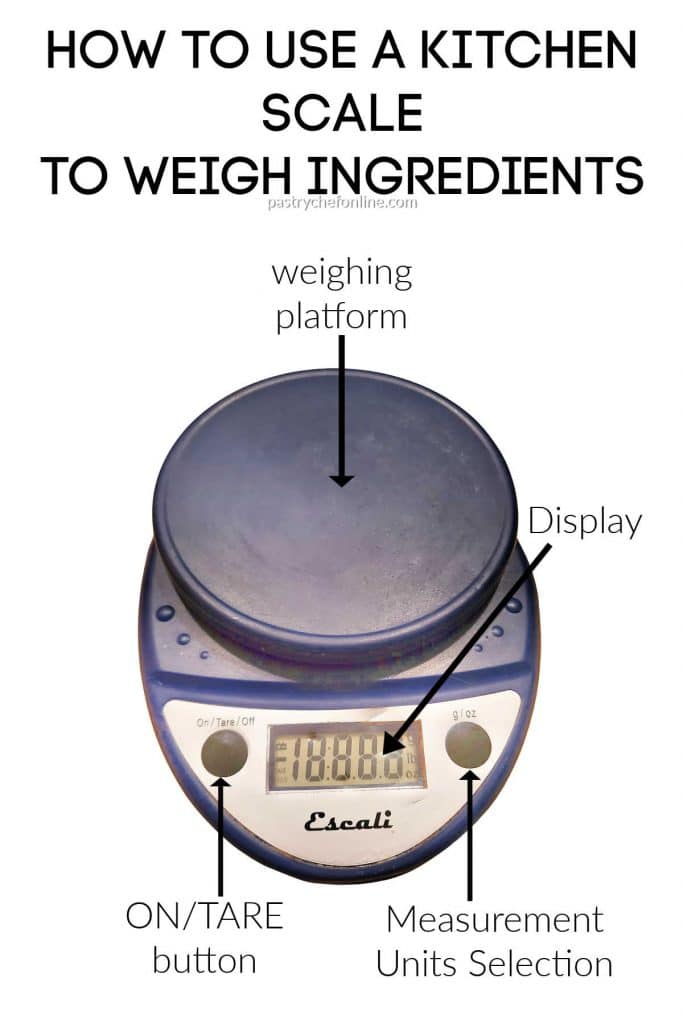
Press the power button to turn on your kitchen scale. Wait until the display shows zero or is ready.
Some scales take a few seconds to calibrate. Make sure the scale is stable before adding anything.
Select The Measurement Unit
Use the unit or mode button to choose your preferred unit. Common units include grams, ounces, pounds, or milliliters.
Pick the unit that matches your recipe for easy reading and accuracy.
Use The Tare Function
Place an empty container or bowl on the scale if needed. Then press the tare button to reset the weight to zero.
This function lets you weigh only the ingredients, not the container.
Selecting Measurement Units
Selecting the right measurement units on your kitchen scale helps you follow recipes accurately. Different recipes and ingredients may require different units. Knowing how to switch units makes your cooking easier and more precise.
Selecting Grams For Precision
Grams are the most common unit for baking recipes. They provide exact measurements, especially for dry ingredients like flour and sugar. Using grams reduces mistakes caused by volume differences.
Using Ounces For Convenience
Ounces are popular in many US recipes. This unit works well for both dry and liquid ingredients. Ounces offer a quick way to measure without converting units.
Choosing Milliliters For Liquids
Milliliters measure liquid ingredients like water, milk, or oil. This unit matches well with grams when measuring liquid density. It helps avoid spills or over-pouring.
Switching Units On Digital Scales
Most digital kitchen scales have a “unit” button. Press it to cycle through grams, ounces, pounds, and milliliters. Stop when your preferred unit appears on the screen.
Matching Units To Your Recipe
Check your recipe to see which units it uses. Match the scale’s units to the recipe’s to avoid confusion. This step saves time and improves accuracy.
Using The Tare Function
The tare function is a key feature on most kitchen scales. It lets you subtract the weight of containers or bowls. This way, you measure only the food’s weight. The tare function helps keep measurements accurate and clean.
Using the tare function saves time and reduces mess. You can add multiple ingredients in one container without weighing separately. This makes cooking and baking easier and more precise.
How To Tare Your Kitchen Scale
First, place your empty container or bowl on the scale. Wait for the weight to show on the screen. Press the tare button to reset the scale to zero. The scale now ignores the container’s weight.
Adding Ingredients After Taring
After taring, add your ingredient to the container. The scale shows only the ingredient’s weight. Add more ingredients one by one, pressing tare each time to reset if needed. This method keeps your measurements exact.
Why Use The Tare Function?
The tare function prevents mistakes in recipes. It helps avoid over- or under-measuring ingredients. It also reduces dirty dishes since you use one container. This simple step improves your cooking results greatly.
Measuring Dry Ingredients
Measuring dry ingredients accurately is key to good cooking and baking. A kitchen scale helps you get exact amounts every time. This prevents mistakes and ensures your recipe turns out just right.
Using a scale is often faster and cleaner than using cups or spoons. It also reduces waste by measuring only what you need. You can weigh flour, sugar, spices, and more with ease.
Place The Container And Tare The Scale
Put an empty bowl or container on the scale. Press the tare button to reset the scale to zero. This step removes the weight of the container from the total weight.
Taring helps you measure just the dry ingredient. Without taring, the scale will show the container’s weight too.
Select The Correct Unit Of Measurement
Choose the unit your recipe calls for. Most kitchen scales allow switching between grams and ounces. Grams are more precise for dry ingredients, especially in baking.
Press the unit button to cycle through available units. Pick the one that matches your recipe instructions.
Add The Dry Ingredient Slowly
Pour or spoon the ingredient into the container slowly. Watch the scale display as the number rises. Stop when you reach the exact weight needed.
Adding ingredients slowly avoids overshooting the amount. If you add too much, remove some and check the weight again.
Credit: pastrychefonline.com
Weighing Liquids Accurately
Weighing liquids accurately is crucial for precise cooking and baking. Unlike dry ingredients, liquids can vary in density, so using volume measurements alone may cause errors. A kitchen scale can measure liquids by weight, giving you consistent results every time.
Using a kitchen scale for liquids helps avoid spills and messy measuring cups. It also saves time by reducing the number of tools you need. Understanding how to weigh liquids properly ensures your recipes turn out just right.
Read more: How Can You Measure 3/4 Cup: Easy Tips for Perfect Accuracy
Using The Tare Function For Liquids
Place your empty container on the scale first. Press the tare button to reset the scale to zero. This step removes the container’s weight from the total measurement. Pour your liquid into the container slowly. The scale shows only the liquid’s weight now.
Choosing The Right Unit Of Measurement
Switch between grams, ounces, or milliliters using the unit button. Grams and ounces measure weight, while milliliters measure volume. Some scales convert weight to volume based on water’s density. Select the unit that fits your recipe for accurate results.
Tips For Accurate Liquid Weighing
Use a container with a wide opening for easy pouring. Place the scale on a flat, stable surface to avoid errors. Avoid air bubbles in thick liquids by stirring gently before weighing. Measure liquids at room temperature for consistent density.
Weighing Without Containers
Weighing without containers on a kitchen scale offers a simple way to measure ingredients directly. This method saves time and reduces cleanup after cooking or baking. It works best for solid items that stay put on the scale’s surface.
Using the scale without a container means you place the food directly on the weighing platform. Ensure the surface is clean and dry before adding the ingredient. This method provides a quick reading without extra steps.
Preparing The Scale Surface
Clean the scale platform thoroughly before use. Remove any dust or residue with a damp cloth. Dry the surface completely to avoid slipping or inaccurate readings.
Place the scale on a flat, stable surface. Avoid soft surfaces like towels or carpets. Stability ensures the scale measures weight correctly.
Choosing The Right Unit
Select the measurement unit suitable for your recipe. Use the unit button to switch between grams, ounces, or pounds. Pick the unit that makes reading easier and matches your instructions.
Choosing the proper unit helps avoid conversion errors. It keeps your measurements consistent and clear.
Adding Ingredients Directly
Gently place your ingredient on the scale platform. Add the amount your recipe requires. Watch the display for the correct weight.
Be careful with small or loose items to avoid spillage. Use a flat scoop or spoon to transfer tiny ingredients.
Cleaning After Use
Remove any leftover food from the scale after weighing. Wipe the platform with a damp cloth. Keep the scale clean to maintain accuracy.
Regular cleaning prevents buildup that may affect future measurements. Store the scale in a dry place to protect its electronics.
Correcting Over-measurements
Over-measuring ingredients can affect your recipe’s outcome. Using a kitchen scale helps catch these errors quickly. Correcting over-measurements ensures your dish turns out just right.
Sometimes you add too much flour or sugar by mistake. A scale lets you fix this without starting over. Small adjustments bring your ingredient amounts back in balance.
How To Remove Excess Ingredients
Place the container back on the scale. Note the weight shown on the display. Gently scoop out some of the ingredient. Watch the scale as you remove it. Stop once the weight matches the recipe’s amount.
Using The Tare Function To Adjust
After removing excess, press the tare button. This resets the scale to zero. Add more ingredients if needed. The scale now shows only the new addition weight. It helps measure precise amounts in steps.
Preventing Over-measurements Next Time
Add ingredients slowly and watch the scale closely. Use smaller containers for better control. Always tare the scale before measuring. These habits reduce chances of adding too much.
Tips For Baking Precision
Precise measurements are vital for perfect baking results. Using a kitchen scale helps achieve this accuracy every time. It ensures you add the right amount of each ingredient, avoiding mistakes and improving taste and texture.
Here are essential tips to enhance your baking precision with a kitchen scale.
Choose The Right Unit Of Measurement
Select grams or ounces based on your recipe. Grams offer more accuracy for baking. Switch units easily using the unit button on your scale.
Use The Tare Function Properly
Place your bowl on the scale first. Press the tare button to reset the weight to zero. This prevents adding the bowl’s weight to your ingredients.
Add Ingredients Slowly
Pour ingredients into the bowl carefully. Watch the scale display to avoid over-measuring. Stop as soon as you reach the desired weight.
Weigh Dry And Liquid Ingredients Separately
Measure dry ingredients like flour and sugar one by one. For liquids, use a suitable container and tare the scale before adding each liquid.
Keep Your Scale On A Flat Surface
Place your scale on a hard, even surface. Avoid soft or uneven places like kitchen towels. This ensures accurate and stable readings.
Maintaining And Calibrating Your Scale
Maintaining and calibrating your kitchen scale keeps it accurate and reliable. Regular care helps avoid errors in measurement. This saves time and prevents cooking mistakes. Follow simple steps to clean and check your scale often. Proper calibration ensures your scale shows the correct weight.
Read more: How to Use a Slow Cooker: Ultimate Guide for Easy, Tasty Meals
Cleaning Your Kitchen Scale
Wipe the scale with a soft, damp cloth. Avoid harsh cleaners or soaking the scale. Remove crumbs and spills after each use. Keep the weighing platform dry and clean. This stops build-up that can affect accuracy.
Storing Your Scale Properly
Store the scale on a flat, dry surface. Avoid areas with high humidity or extreme temperatures. Keep it away from heavy objects that may press on the platform. This prevents damage and maintains its sensitivity.
Calibrating Your Kitchen Scale
Use the calibration weight provided or a known weight. Follow the manufacturer’s instructions to enter calibration mode. Place the weight on the scale and wait for it to adjust. Repeat calibration regularly or if the scale shows wrong readings.
Checking Accuracy Periodically
Test the scale with common kitchen items like coins or packaged weights. Compare the scale reading with the item’s known weight. If the reading is off, recalibrate the scale. Regular checks help catch errors early.
Frequently Asked Questions
Do You Put Food Directly On A Food Scale?
Avoid placing food directly on the scale to keep it clean. Use a bowl or container, then press the tare button to zero the weight before adding food. This method ensures accurate measurements and prevents contamination.
What Does 4 Oz Look Like On A Kitchen Scale?
Four ounces on a kitchen scale typically shows the number “4. 0 oz” on the digital display. It equals about 113 grams.
How Do I Reset My Digital Kitchen Scale?
To reset your digital kitchen scale, turn it on and press the tare or zero button. This clears the weight to zero. Place a container, press tare again to exclude its weight. Your scale is now ready for accurate measurements.
How To Use A Weighing Scale Step By Step?
Place the scale on a flat surface. Turn it on and select your unit. Press tare to zero out the container’s weight. Slowly add ingredients until reaching desired weight. Read the measurement clearly before removing items.
How Do I Zero Or Tare A Kitchen Scale?
Place your empty bowl on the scale. Press the tare button to reset the weight to zero. Now, only the ingredient’s weight will show.
Conclusion
Using a kitchen scale helps you measure ingredients accurately every time. Place the scale on a flat surface for best results. Always reset the scale to zero before adding ingredients. Choose the right units to match your recipe. Accurate measurements improve your cooking and baking outcomes.
This simple tool reduces food waste and saves money. Practice using your scale to become more confident. Enjoy cooking with precision and less guesswork.
Read more: Best Baking Sheets Non Toxic: Safe & Durable Picks for 2026